Perfume Shop App UI in Flutter (Home + Details)
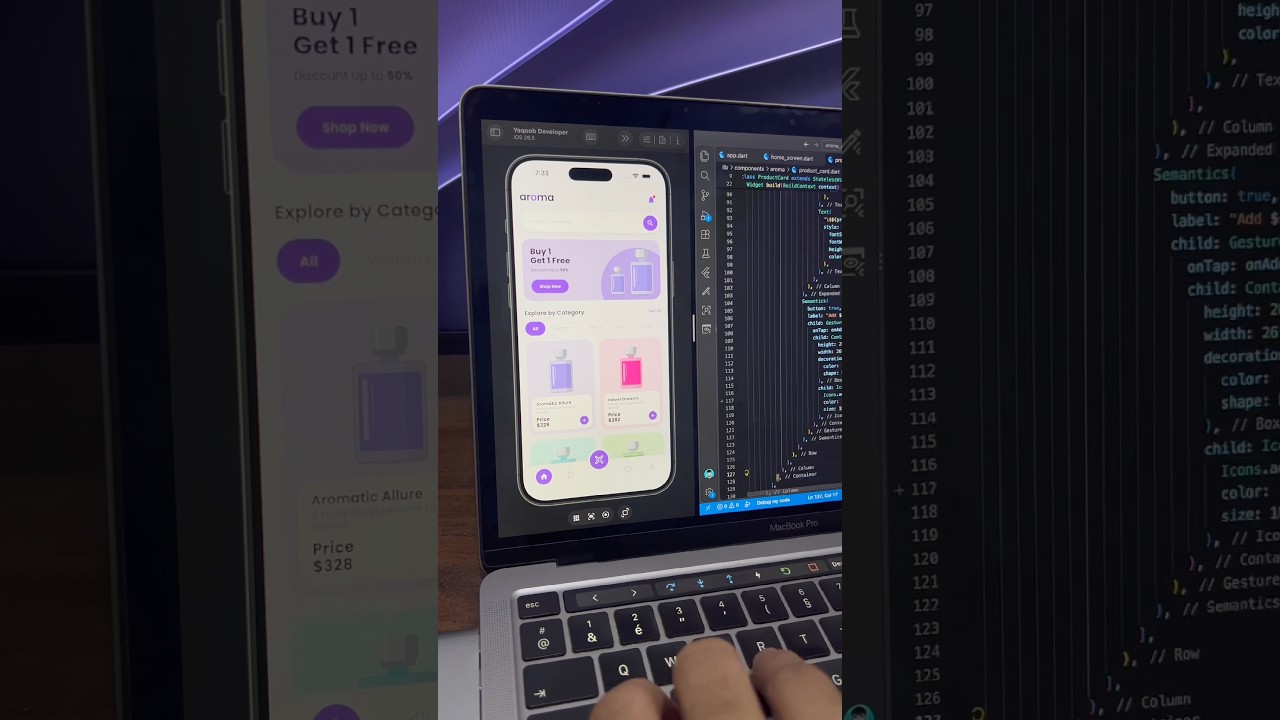
A soft purple perfume shop app built in Flutter, with a home screen featuring a promo banner, category chips and product grid, plus a product details screen with color variants, size selector and quantity counter.
- #E-commerce
- #Shopping App
- #Perfume App
- #Product Details
- #Product Grid
- #Variant Selector
- #Bottom Navigation
- #Purple UI
Free for everyone. Sign in with Google, no password needed.
Overview
This project is a clean and colorful perfume shopping app UI built in Flutter, including two complete screens: a home screen and a product details screen. It uses a soft lavender and purple theme with pastel product cards, creating a gentle, elegant look that suits beauty and fragrance brands perfectly. Together, the two screens form a real e-commerce flow, from browsing products to choosing options and buying. The home screen opens with the app’s logo, “aroma”, written in bold dark lowercase letters with the “o” highlighted in purple. On the right is a purple notification bell with a small red dot. Below the header is a white pill-shaped search bar with a round purple search button and a soft shadow that lifts it off the background. Next is a large promo banner with a light lavender background. On the left, a bold “Buy 1 Get 1 Free” heading sits above a line about discounts up to 50%, followed by a purple “Shop Now” button. On the right, a large purple circle holds two perfume bottle illustrations. This banner can easily be turned into a carousel for multiple offers. Under the banner is an “Explore by Category” section with a “See all” link and a horizontal row of category chips for All, Women’s, Men’s, Kids and Unisex. The selected chip is highlighted with a filled purple pill, while the others stay as plain grey text. The product section uses a two-column grid of cards. Each card has its own pastel background, such as lavender, pink, light blue and soft green, with a matching perfume bottle illustration on top. Below the bottle, a white inner card shows the product name, a short description, the price and a round purple add button. At the bottom is a custom navigation bar with Home, Bag, Favorites and Profile icons. The active Home icon sits inside a filled purple circle, and a raised purple QR code button floats in the center, giving quick access to a scan feature for in-store products or promo codes. Tapping a product opens the details screen. At the top is a simple app bar with a purple back arrow, a centered “Details” title and a shopping bag icon. Below it, a large rounded card in a soft pastel color shows the product name, the price in large bold text and a big perfume bottle illustration. On the right side of the card, three white rounded buttons let users add the product to favorites, like it or share it. Under the main card is a row of four color variant thumbnails in lavender, teal, green and pink. The selected variant is marked with a purple border, and choosing a different one updates the main preview. This is a great example of how to build product variant selectors in Flutter. Below the variants is a Size row with pill options for 50 ml, 100 ml and 150 ml, where the selected size is filled in purple. A Description section follows with a short paragraph about the fragrance notes. At the bottom, a white quantity counter with minus and plus buttons sits next to a full-width purple “Buy Product” button, keeping the main actions within easy thumb reach. The color palette is built around soft lavender, rich purple and white, with pastel pink, teal and green used for products. These colors feel calm, feminine and premium, making the design ideal for perfume, cosmetics and beauty brands. Rebranding is simple: change the purple to your brand color and adjust the pastel tints. This UI works well for perfume and fragrance stores, cosmetics and skincare apps, beauty marketplaces, gift shops and boutique e-commerce apps. It’s also a strong reference for developers who want to learn promo banners, category chips, product grids, custom bottom navigation with a floating button, variant selectors, size chips and quantity counters. The project is built entirely with Flutter widgets and is easy to customize. You can connect products to Firebase, Supabase or your own REST API, add a cart and checkout flow, and link the QR button to a scanner package like mobile_scanner. If you’re learning Flutter, this project is a practical way to understand GridView layouts, screen navigation, state handling for selections, custom navigation bars and clean e-commerce screen structure.
Watch the build
Keep exploring
Related projects
 Auth / Login UI
Music App Login Screen UI in Flutter
A bold neon lime login screen for a music app built in Flutter, with a headphone logo, white rounded input fields, black Login button and colorful social login icons.
- #Login
- #Authentication
- #Music App
 Auth / Login UI
Teal Login Screen with Sign Up Toggle in Flutter
A modern dark teal login screen built in Flutter, with a gradient background, Login/Sign Up toggle, rounded input fields and a bottom-anchored mint Log Me In button.
- #Login
- #Sign Up
- #Authentication
 Auth / Login UI
Yellow and Black Login Screen UI in Flutter
A bold yellow and black login screen built in Flutter, with a curved two-tone layout, rounded input fields, wide-spaced button text and a separate Sign Up section.
- #Login
- #Authentication
- #Yellow UI