Dart Basics for Flutter Beginners: Variables, Functions and Classes
Learn the Dart you need for Flutter: variables, final and const, null safety, lists and maps, if and loops, functions with named parameters, classes, and async/await, with runnable examples.
By Yaqoob Developer · · 9 min read
- #Dart
- #Flutter
- #Beginners
- #Null Safety
- #OOP
Every Flutter app is written in Dart. You do not need to master Dart before starting Flutter, but knowing the basics makes every Flutter tutorial much easier to follow.
This guide covers exactly the Dart you need for Flutter, with short examples you can run yourself. No previous programming experience is required.
In this post you will learn:
- How to run Dart code without installing anything
- Variables and data types:
var,final,const,int,String,booland more - Null safety:
?,!,??andlate - Lists and maps
if,forandwhile- Functions, including named and optional parameters
- Classes, constructors and objects
asyncandawait, which Flutter uses everywhere
How to run Dart code
The easiest way is DartPad, a free Dart editor in your browser. Paste any example from this post and press Run.
If Flutter is installed on your computer, Dart is already installed too. Create a file called hello.dart:
void main() {
  print('Hello, Dart!');
}
And run it from the terminal:
dart run hello.dart
Output:
Hello, Dart!
Every Dart program starts from the main() function. print() writes text to the console. Every statement ends with a semicolon ;.
Variables
A variable is a named box that stores a value.
void main() {
  var name = 'Ali';      // Dart guesses the type: String
  int age = 21;          // you write the type yourself
  double height = 5.9;
  bool isStudent = true;

  print(name);
  print(age);
}
Dart is a type-safe language. Once name is a String, you cannot put a number in it:
var name = 'Ali';
name = 25; // ❌ Error: A value of type 'int' can't be assigned to a variable of type 'String'
This sounds strict, but it catches many bugs before your app runs.
The basic data types
| Type | Stores | Example |
|---|---|---|
int | whole numbers | 42 |
double | decimal numbers | 3.14 |
num | either int or double | 10 or 2.5 |
String | text | 'Hello' |
bool | true or false | true |
List | an ordered list of values | [1, 2, 3] |
Map | key-value pairs | {'name': 'Ali'} |
final and const
Use final or const when a value should never change:
final today = DateTime.now(); // set once, when the code runs
const pi = 3.14159;           // known before the app even runs

today = DateTime(2020); // ❌ Error: can't be assigned, it's final
final: the value is set once and then locked. It can be calculated while the app runs.const: the value is fixed at compile time, before the app runs.
In Flutter you will see const everywhere, like const Text('Hello'). It tells Flutter the widget never changes, so it can reuse it instead of rebuilding it, which makes your app faster.
Rule of thumb: use final by default, const when you can, and var only when the value really needs to change.
Strings
void main() {
  final firstName = 'Yaqoob';
  final language = 'Flutter';

  // String interpolation: put a variable inside a string with $
  print('Hi, I am $firstName');

  // Use ${} for expressions
  print('$language has ${language.length} letters');

  // Multi-line strings use three quotes
  final message = '''
Line one
Line two''';
  print(message);
}
Output:
Hi, I am Yaqoob
Flutter has 7 letters
Line one
Line two
String interpolation ($name and ${...}) is used constantly in Flutter, for example Text('Hello, $userName').
Null safety
In Dart, a variable cannot be null unless you allow it. This prevents the famous "null pointer" crashes.
String name = 'Ali';
name = null; // ❌ Error: null can't be assigned to String

String? nickname;  // the ? means "this can be null"
print(nickname);   // null
Dart gives you three helpful operators for nullable values:
void main() {
  String? nickname;

  // ?? : use a default value if it's null
  print(nickname ?? 'No nickname');

  // ?. : only call it if it's not null
  print(nickname?.length);

  nickname = 'Ali';

  // ! : "I promise it's not null" (crashes if you're wrong)
  print(nickname!.length);
}
Output:
No nickname
null
3
Use ! carefully. If the value is null, your app crashes. Prefer ?? or an if check whenever you can.
late
late means "this is not null, but I will set it a little later":
late String description;

void main() {
  description = 'Set before use';
  print(description);
}
You will see late in Flutter State classes, for example a value set in initState(). If you read a late variable before setting it, you get a LateInitializationError.
Lists
A List is an ordered collection. The first item is at index 0.
void main() {
  final fruits = ['Apple', 'Banana', 'Mango'];

  print(fruits[0]);       // Apple
  print(fruits.length);   // 3

  fruits.add('Orange');
  fruits.remove('Banana');
  print(fruits);          // [Apple, Mango, Orange]

  // Transform every item
  final upper = fruits.map((f) => f.toUpperCase()).toList();
  print(upper);           // [APPLE, MANGO, ORANGE]

  // Keep only some items
  final withA = fruits.where((f) => f.contains('a')).toList();
  print(withA);           // [Mango, Orange]
}
final on a list means the variable always points to the same list, but you can still add or remove items. In Flutter, you turn lists of data into lists of widgets with map, for example fruits.map((f) => Text(f)).toList().
Maps
A Map stores key-value pairs, like a dictionary. JSON data from APIs is turned into maps.
void main() {
  final user = {
    'name': 'Ali',
    'city': 'Lahore',
  };

  print(user['name']);       // Ali

  user['email'] = 'ali@example.com';
  print(user.keys);          // (name, city, email)

  user.forEach((key, value) {
    print('$key: $value');
  });
}
Conditions and loops
if / else
void main() {
  final score = 72;

  if (score >= 80) {
    print('Excellent');
  } else if (score >= 50) {
    print('Passed');
  } else {
    print('Try again');
  }

  // Short version for simple choices: condition ? ifTrue : ifFalse
  final result = score >= 50 ? 'Pass' : 'Fail';
  print(result);
}
The short ? : form (called the ternary operator) is everywhere in Flutter, for example isLoading ? CircularProgressIndicator() : Text('Done').
for and while
void main() {
  for (var i = 1; i <= 3; i++) {
    print('Count $i');
  }

  final colors = ['Red', 'Green', 'Blue'];
  for (final color in colors) {
    print(color);
  }

  var tries = 0;
  while (tries < 2) {
    tries++;
    print('Try $tries');
  }
}
Functions
A function is a reusable block of code.
int add(int a, int b) {
  return a + b;
}

// Arrow syntax for one-line functions
int multiply(int a, int b) => a * b;

void main() {
  print(add(2, 3));       // 5
  print(multiply(4, 5));  // 20
}
The word before the name (int) is the return type. void means the function returns nothing.
Named parameters
Named parameters are wrapped in {}, and you pass them by name. Flutter widgets use them all the time, like Text('Hi', style: ...).
void greet({required String name, String greeting = 'Hello'}) {
  print('$greeting, $name!');
}

void main() {
  greet(name: 'Ali');                     // Hello, Ali!
  greet(name: 'Sara', greeting: 'Salam'); // Salam, Sara!
}
requiredmeans the caller must pass it.greeting = 'Hello'gives a default value, so it is optional.
Functions as values
In Dart you can pass a function to another function. This is exactly what you do in Flutter with onPressed: () { ... }.
void runTwice(void Function() action) {
  action();
  action();
}

void main() {
  runTwice(() => print('Button tapped'));
}
Classes and objects
A class is a blueprint. An object is something built from that blueprint.
class Student {
  Student({required this.name, required this.age});

  final String name;
  final int age;

  void introduce() {
    print('I am $name and I am $age years old.');
  }

  bool get isAdult => age >= 18;
}

void main() {
  final ali = Student(name: 'Ali', age: 21);
  final sara = Student(name: 'Sara', age: 16);

  ali.introduce();          // I am Ali and I am 21 years old.
  print(sara.isAdult);      // false
}
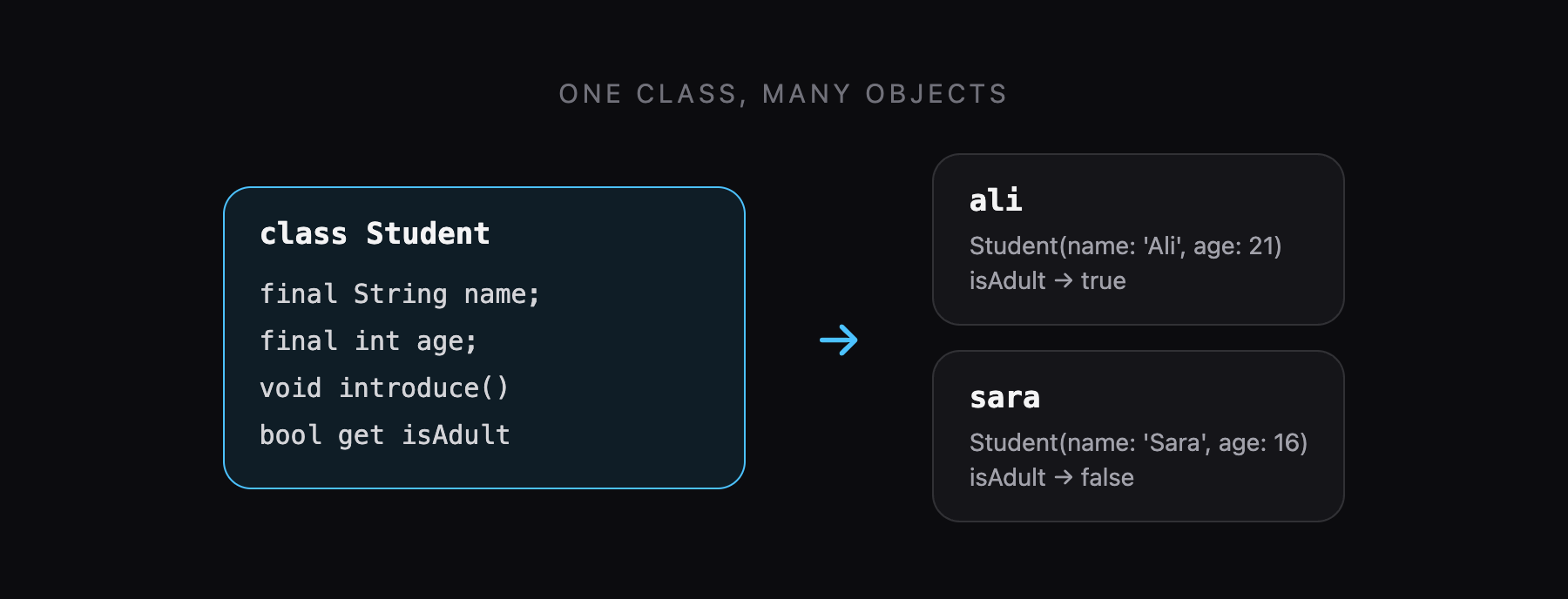
Student({required this.name, required this.age})is the constructor.this.namesaves the passed value straight into thenamefield.introduce()is a method: a function that belongs to the class.isAdultis a getter: it looks like a field but is calculated each time.
Inheritance with extends
A class can build on another class with extends:
class Animal {
  void speak() => print('...');
}

class Cat extends Animal {
  @override
  void speak() => print('Meow');
}

void main() {
  Cat().speak(); // Meow
}
Now look at a Flutter widget again:
class MyApp extends StatelessWidget {
  const MyApp({super.key});

  @override
  Widget build(BuildContext context) {
    return const Text('Hello');
  }
}
It is just a class that extends StatelessWidget and overrides the build method. Once you understand classes, Flutter code stops looking scary.
async and await
Some tasks take time: loading data from the internet, reading a file, waiting for Firebase. Dart handles these with a Future, a value that will arrive later.
Future<String> fetchUserName() async {
  // Pretend this is a slow network request
  await Future.delayed(const Duration(seconds: 2));
  return 'Ali';
}

Future<void> main() async {
  print('Loading...');
  final name = await fetchUserName();
  print('Welcome, $name');
}
Output:
Loading...
Welcome, Ali
(The second line appears after 2 seconds.)
asyncmarks a function that does slow work. It always returns aFuture.awaitwaits for the Future to finish without freezing the app. Buttons still work and animations keep running.
Handle errors with try / catch:
try {
  final name = await fetchUserName();
  print(name);
} catch (e) {
  print('Something went wrong: $e');
}
You will use this pattern for every API call and every Firebase call in Flutter.
Quick reference
| You see in Flutter | Dart concept |
|---|---|
const Text('Hi') | const value |
Text('Hello, $name') | string interpolation |
String? error | nullable type |
user?.email ?? '' | null-aware operators |
padding: EdgeInsets.all(8) | named parameter |
onPressed: () {} | function as a value |
items.map((i) => Text(i)).toList() | list map |
class MyApp extends StatelessWidget | class and inheritance |
@override Widget build(...) | method override |
await http.get(url) | async / await |
Common beginner mistakes
Forgetting the semicolon
Every statement ends with ;. The error "Expected to find ';'" points to the line just before the problem.
Using ! to silence errors
Adding ! makes the red line disappear, but if the value is null your app crashes at runtime. Handle null properly with ?? or an if check.
Mixing int and double
int x = 5 / 2; fails, because / always returns a double. Use ~/ for whole-number division (5 ~/ 2 is 2) or make the variable a double.
Forgetting await
If you call an async function without await, you get a Future instead of the value, and printing it shows Instance of 'Future<String>'.
What to learn next
You now know the Dart you need to read and write Flutter code. Put it into practice:
- Your First Flutter App: Step-by-Step Tutorial for Beginners
- Flutter Row, Column and Stack Explained with Examples
- How to Fetch API Data in Flutter Using HTTP, which uses async/await, maps and classes together
Keep reading
More articles
· 9 min read
Flutter Row, Column and Stack Explained with Examples
Understand Flutter's core layout widgets: main and cross axis, mainAxisAlignment, crossAxisAlignment, Expanded, Flexible, Spacer, Stack and Positioned, plus a complete profile card example.
· 7 min read
Flutter Navigation: How to Move Between Screens
Learn Flutter navigation step by step: Navigator.push and pop, passing data to a screen, returning results, pushReplacement for login flows, named routes, and when to use go_router.
· 7 min read
Flutter ListView and GridView: Complete Beginner Guide
Build scrolling lists and grids in Flutter: ListView, ListView.builder, ListView.separated, horizontal lists, GridView.builder, childAspectRatio, and a complete responsive product grid.