Flutter UI Kit · 30 screens
Fade – Salon & Barber Booking UI Kit
30 polished salon and barber booking screens with full Flutter source code and dark and light themes. Start your booking app from a complete flow, not a blank project.
Secure checkout by Polar · Instant download by email
- 30 ready-made screens
- Full Flutter source code (Android, iOS and web)
- Framework Flutter 3.35+
- Dark and light themes, switchable in the app
- Complete booking flow with calendar and time slots
- 20+ reusable widgets
- Central theme for colors and fonts
- No third-party packages
- Detailed README setup guide
- Commercial use license
Screens
20 screens in this kit
Why this kit
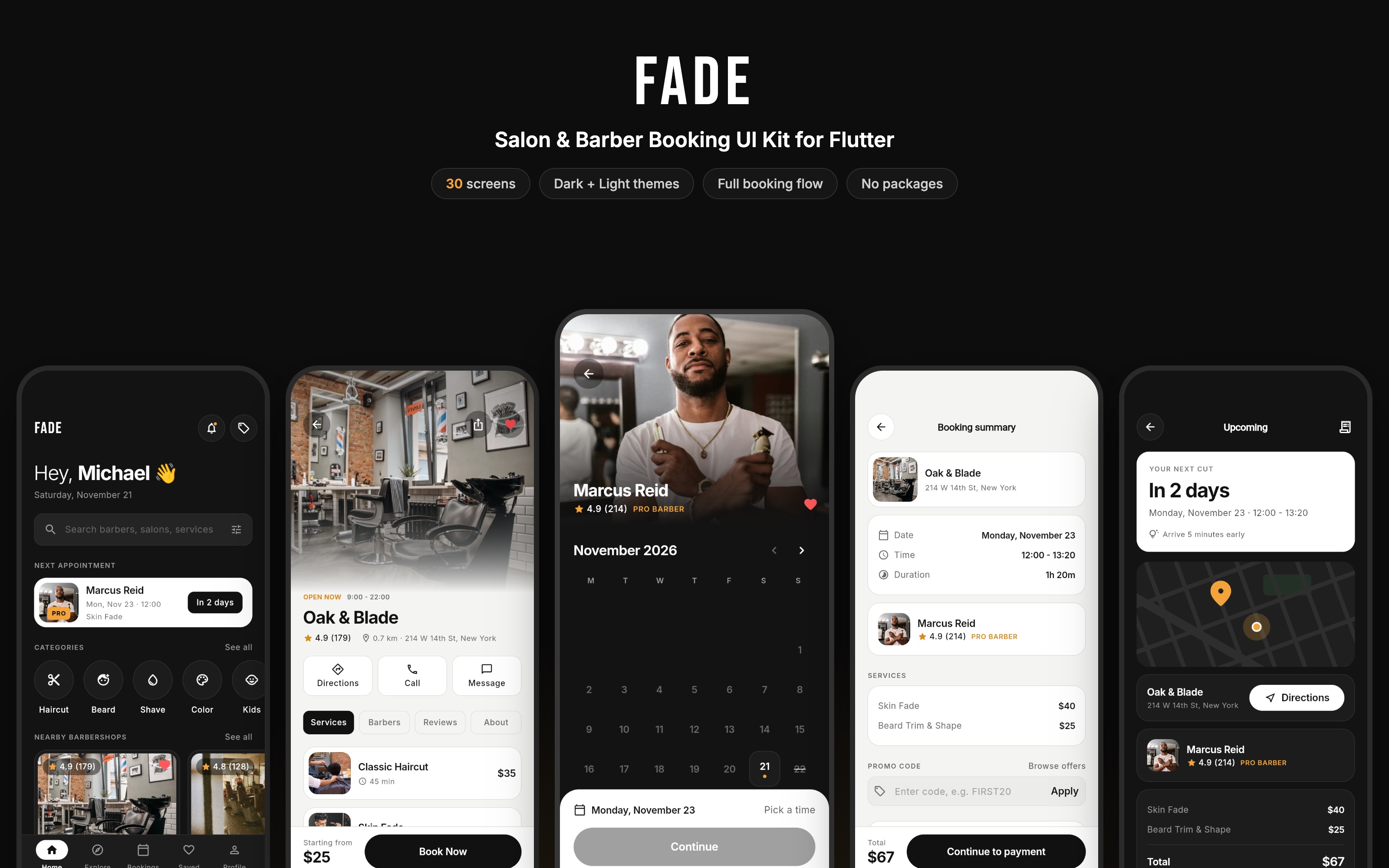
Booking apps for barbershops and salons all need the same things: a way to find a shop, pick services, choose a barber, find a free time and pay. Fade gives you all of it as 30 connected Flutter screens, so you start from a working booking flow instead of a blank project.
The design is dark and editorial, in the style of a premium barbershop: white pill buttons, amber accents for ratings and "Open now", and large photos of the shops and the barbers. A full light theme is included, and people can switch between Dark, Light and System in Settings.
Screens
- Authentication: Splash, Onboarding, Login, Sign Up
- Discover: Home, Search / Explore, Search Results (list and map), Salon Details, Services, Service Details
- Booking flow: Choose Barber, Date & Time, Booking Summary, Booking Success
- Bookings: My Bookings, Upcoming Booking, Booking Details, Cancel Booking
- Payment: Payment Method, Add Card, Payment Success
- Profile: Profile, Edit Profile, Notifications, Settings
- Engagement: Reviews & Ratings, Write Review, Favorites, Offers & Coupons, Empty State
How the booking flow works
The screens are connected, so you can try the whole flow in the app:
- Pick one or more services. The bottom bar adds up the price and the time.
- Choose a barber, or "Any available professional".
- Pick a day in the calendar and a free time slot. Sundays are closed, past days are disabled and taken slots are crossed out.
- Check the summary and apply a promo code, or pick a coupon from the Offers screen.
- Pay with a saved card or a wallet, or choose "Pay at salon".
- The booking appears under My Bookings with a check-in code, and it can be cancelled with a reason.
Built to customize
- All colours live in one palette per theme, so changing the accent colour updates every screen.
- 20+ reusable widgets: salon cards, barber cards, service cards, coupon tickets, rating badges, the app bar and the bottom action bar.
- The sample data lives in one file, so it is easy to replace with your own API.
- Every screen opens on its own with sample data, and an "All screens" catalog jumps to any of them.
- Plain Flutter with no third-party packages, so there are no version conflicts.
- Layouts stay centred and readable on tablets and on the web.
Requirements
- Flutter 3.35 or newer
- Dart 3.9 or newer
Please note
This is a UI kit. It does not include a backend: sign-in, payments and bookings are simulated with sample data. The README explains where to connect your own API. The demo photos come from Pexels; replace them with your own before you publish an app.
FAQ
- How do I get the files?
- Right after payment, Polar emails you a link to your customer portal, where you can download the ZIP. You can download it again any time from the portal.
- What do I need to run it?
- A Flutter SDK (3.35+) and any editor. Unzip, run flutter pub get, then flutter run.
- Can I use it in client or commercial apps?
- Yes, in as many of your own and your clients' apps as you like. You can't resell or share the source code itself.
- Is the payment secure?
- Checkout is handled by Polar, which processes the payment and handles sales tax and VAT. Your card details never touch this site.
- Have another question?
- Send me a message and I’ll get back to you.